> ## Documentation Index
> Fetch the complete documentation index at: https://docs.rodyne.xyz/llms.txt
> Use this file to discover all available pages before exploring further.
# Security and privacy
> How Rodyne separates sessions, scopes access, audits changes, and handles provider uncertainty.
Rodyne is designed for communities where identity, permission, and provider state can change between request and execution.
## Tenant and session boundaries
* Every staff request is authenticated and scoped to a workspace.
* Staff, Cnect, Connect, and Member Dash sessions are distinct audiences.
* Host-scoped secure cookies are used in production flows.
* Sensitive personal API responses are private and non-cacheable.
* Session rotation and revocation remain available in account management.
## Least privilege
Capabilities are checked in the API, not only hidden in the interface. Discord role grants use current provider membership. Native Discord permission and hierarchy checks remain separate from Rodyne access.
## Durable work and idempotency
Provider writes use durable jobs and idempotency keys. Expired leases and ambiguous network results do not become automatic success. Rodyne reads provider state before continuing where supported.
## Audit trail
Configuration changes, approvals, execution, corrections, releases, withdrawals, and repair actions create workspace-scoped audit records. Some operational records are append-only by design.
## Secret handling
Keep Discord tokens, Roblox keys, Stripe secrets, webhook URLs, connector secrets, and third-party provider keys in server-side deployment configuration.
Never place provider secrets in browser-visible variables, documentation, Discord messages, screenshots, tickets, or source control.
## Member data
Member Dash exposes only reviewed fields and member-safe text through active releases. Cnect provides unlinking and privacy information. Community record requests remain the responsibility of the relevant community administrators, with Rodyne privacy requests available through **[hello@rodyne.xyz](mailto:hello@rodyne.xyz)**.
## Responsible operations
* Use canary accounts and low-risk records for first live tests.
* Do not infer provider success from a queued job or a successful HTTP response.
* Do not treat third-party safety signals as automatic moderation findings.
* Verify the actual provider object before retrying an uncertain write.
* Narrow access promptly when responsibilities change.
## Guided walkthrough
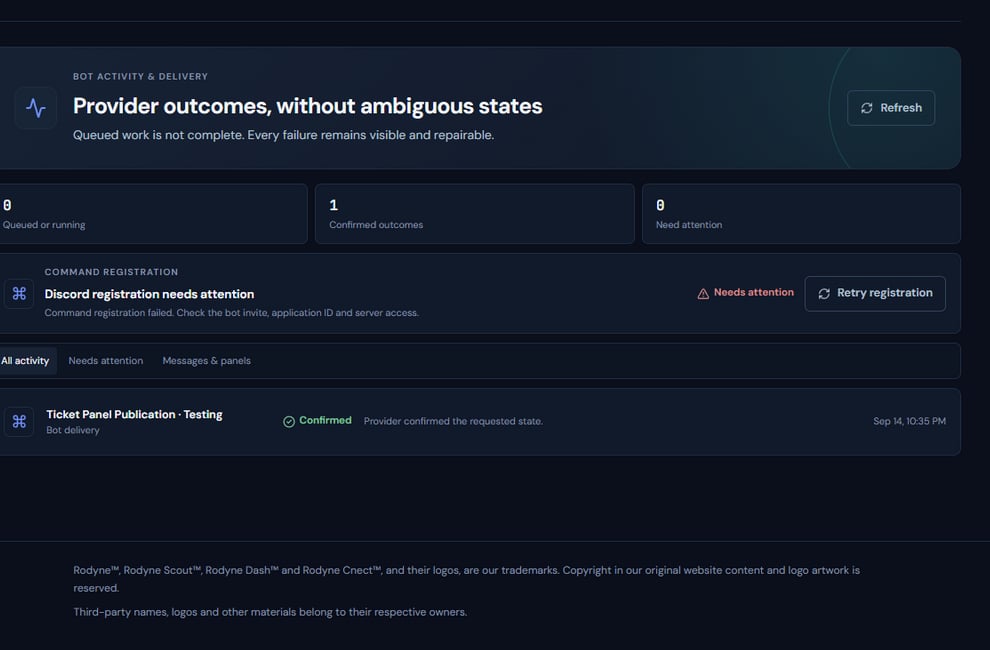 The screenshot above is from the live Rodyne product. Use it to orient yourself, but rely on the current record state and live provider checks when operating the workspace.
## Operating procedure
Separate public configuration, staff-only records, restricted evidence, and member-safe disclosure.
Grant capabilities and provider scopes for the actual task only.
Keep secrets server-side and sensitive records inside their controlled modules.
Require provider read-back for consequential external changes.
Review high-risk actions and promptly remove obsolete sessions, grants, and credentials.
## Acceptance checks
| Check | Ready when | If it is not ready |
| ---------- | ------------------------------------------------------- | -------------------------------- |
| Secrets | No credential appears in browser, docs, chat, or source | Rotate and remove it immediately |
| Tenant | Record belongs to the active workspace | Stop and correct scope |
| Disclosure | Member output contains only approved fields | Withdraw the release |
## Failure recovery
For suspected exposure, revoke the affected credential or session first, preserve the audit evidence, replace the secret, and verify that old access no longer works. Avoid copying the leaked value into the incident record.
## Continue the workflow
The screenshot above is from the live Rodyne product. Use it to orient yourself, but rely on the current record state and live provider checks when operating the workspace.
## Operating procedure
Separate public configuration, staff-only records, restricted evidence, and member-safe disclosure.
Grant capabilities and provider scopes for the actual task only.
Keep secrets server-side and sensitive records inside their controlled modules.
Require provider read-back for consequential external changes.
Review high-risk actions and promptly remove obsolete sessions, grants, and credentials.
## Acceptance checks
| Check | Ready when | If it is not ready |
| ---------- | ------------------------------------------------------- | -------------------------------- |
| Secrets | No credential appears in browser, docs, chat, or source | Rotate and remove it immediately |
| Tenant | Record belongs to the active workspace | Stop and correct scope |
| Disclosure | Member output contains only approved fields | Withdraw the release |
## Failure recovery
For suspected exposure, revoke the affected credential or session first, preserve the audit evidence, replace the secret, and verify that old access no longer works. Avoid copying the leaked value into the incident record.
## Continue the workflow