> ## Documentation Index
> Fetch the complete documentation index at: https://docs.rodyne.xyz/llms.txt
> Use this file to discover all available pages before exploring further.
# Member Dash
> Release reviewed personal records through a separate member-safe portal.
Rodyne Dash is the separate member portal at [dash.rodyne.xyz](https://dash.rodyne.xyz). Members sign in through Cnect without receiving staff access.
## Disclosure is off by default
Existing workspaces begin with Dash disabled, and source records are not automatically published. Owners configure sections, allowed fields, eligible statuses, ordering, labels, and former-member policy.
Each record release requires:
* `dash.disclose` authority.
* Permission to read the source record.
* Reviewed member-safe text.
* An eligible, verified identity relationship.
* An enabled section and current settings revision.
## What is excluded
Member responses exclude internal reasons, private notes, evidence, ticket transcripts, raw provider payloads, and other fields outside the approved contract. Restricted releases keep their original authorization requirements.
Reports **about** a member and reports **submitted by** a member are independent sections and releases. Submitted in-game reports require the signed connector's real Roblox submitter proof.
## Exact preview
Use **Workspace settings → Member Dash** to preview a specific member. Exact preview calls the same eligibility and serialization logic as the member API; it cannot bypass restricted-record or network controls.
## Release and withdrawal
Choose allowed fields, labels, eligible statuses, order, and former-member behavior.
Current OAuth ownership, first-party Cnect proof, conflicts, membership policy, and audited relationship must agree.
Summarize only what should be shown to the member. Do not copy internal notes automatically.
Inspect the exact member view before release.
Release creates the member-visible record. Withdrawal removes active disclosure while retaining the audit history.
## Session separation
Dash, staff, and Cnect sessions are separate. A staff session does not grant Dash access, and a Cnect session does not grant staff access. Personal responses are private and non-cacheable.
## Guided walkthrough
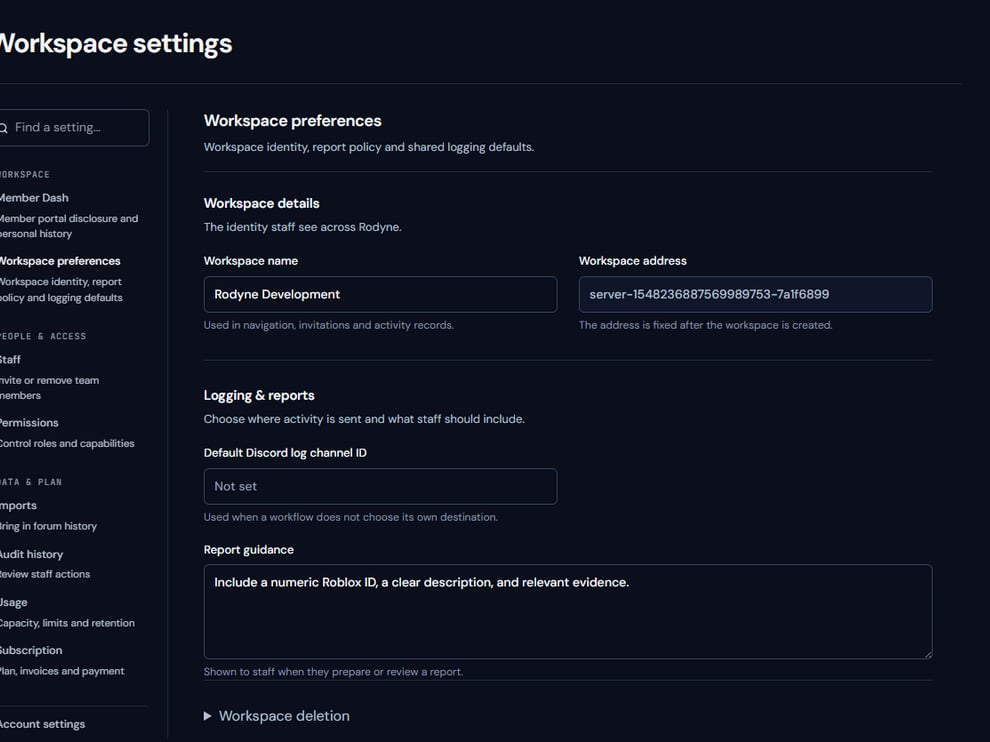 The screenshot above is from the live Rodyne product. Use it to orient yourself, but rely on the current record state and live provider checks when operating the workspace.
## Operating procedure
Design sections and eligibility before enabling the portal.
Allow only the fields necessary for the member-facing purpose.
Create member-safe text independently of private notes and evidence.
Use the real eligibility and serializer path rather than a generic mock-up.
Publish deliberately, verify in Dash, and withdraw when disclosure should end.
## Acceptance checks
| Check | Ready when | If it is not ready |
| ----------- | ----------------------------------------------- | --------------------------------------- |
| Eligibility | Verified identity and current policy agree | Resolve the relationship before release |
| Content | No notes, evidence, or raw payloads are exposed | Rewrite the member-safe summary |
| Revision | Preview uses current settings | Preview again after settings change |
## Failure recovery
If a member cannot see a release, check the Dash session, identity relationship, workspace policy, section eligibility, and release revision. Do not grant staff access as a workaround.
## Continue the workflow
The screenshot above is from the live Rodyne product. Use it to orient yourself, but rely on the current record state and live provider checks when operating the workspace.
## Operating procedure
Design sections and eligibility before enabling the portal.
Allow only the fields necessary for the member-facing purpose.
Create member-safe text independently of private notes and evidence.
Use the real eligibility and serializer path rather than a generic mock-up.
Publish deliberately, verify in Dash, and withdraw when disclosure should end.
## Acceptance checks
| Check | Ready when | If it is not ready |
| ----------- | ----------------------------------------------- | --------------------------------------- |
| Eligibility | Verified identity and current policy agree | Resolve the relationship before release |
| Content | No notes, evidence, or raw payloads are exposed | Rewrite the member-safe summary |
| Revision | Preview uses current settings | Preview again after settings change |
## Failure recovery
If a member cannot see a release, check the Dash session, identity relationship, workspace policy, section eligibility, and release revision. Do not grant staff access as a workaround.
## Continue the workflow