> ## Documentation Index
> Fetch the complete documentation index at: https://docs.rodyne.xyz/llms.txt
> Use this file to discover all available pages before exploring further.
# Operate a Cnect network
> Coordinate identity and approved staff changes across controlled communities.
Cnect networks connect owner-controlled Rodyne communities while keeping local workspaces, permissions, reports, and ordinary rank requests authoritative.
## Core principles
* Each provider resource has one controlling community.
* Groups and experiences are different resource types even when their numeric IDs match.
* A workspace manager has no implicit network authority.
* Policy edges describe allowed relationships; drawing an edge does not execute writes.
* Network writes stay behind a separate owner-controlled safety switch.
## Pilot setup
Add owner-controlled workspaces, then connect each Discord server, Roblox group, and required Studio experience. An experience cannot execute a group rank change.
Create canonical positions and map every participating resource's actual roles. Configure a non-staff fallback for Roblox discharge.
Grant network administration or independent approval to the intended people. Keep local workspace authority separate.
Use first-party Cnect proof. Review conflicts without merging unrelated source records.
Run a read-only simulation for a named person and review every current state, intended role, exception, warning, and access effect.
The network owner confirms the network name and enables approved writes. A simulation of the current policy revision is required.
Distinct authorized people approve the proposal. Start with one controlled person and confirm every target read-back.
## Reconciliation
The reconciliation view shows the desired revision, pinned policy, independent approvals, employment event, and every provider target. Revocations run before grants. Work for one person is serialized; unrelated people may run concurrently.
The worker rechecks authority, identity, entitlement, policy revision, provider capability, and protected roles before writing.
## Kill switch
Turn off **Allow approved network writes** in Network safety to stop new target claims and later steps. An already in-flight provider request can still finish; read-back and diagnosis continue.
If policy or approvals changed, cancel unfinished work only when no target is running and create a fresh simulation. Reinstatement is a new approved operation; it does not erase the discharge history.
Never describe a network discharge as complete until every required target is provider-confirmed and the intended access effect has been reviewed.
## Guided walkthrough
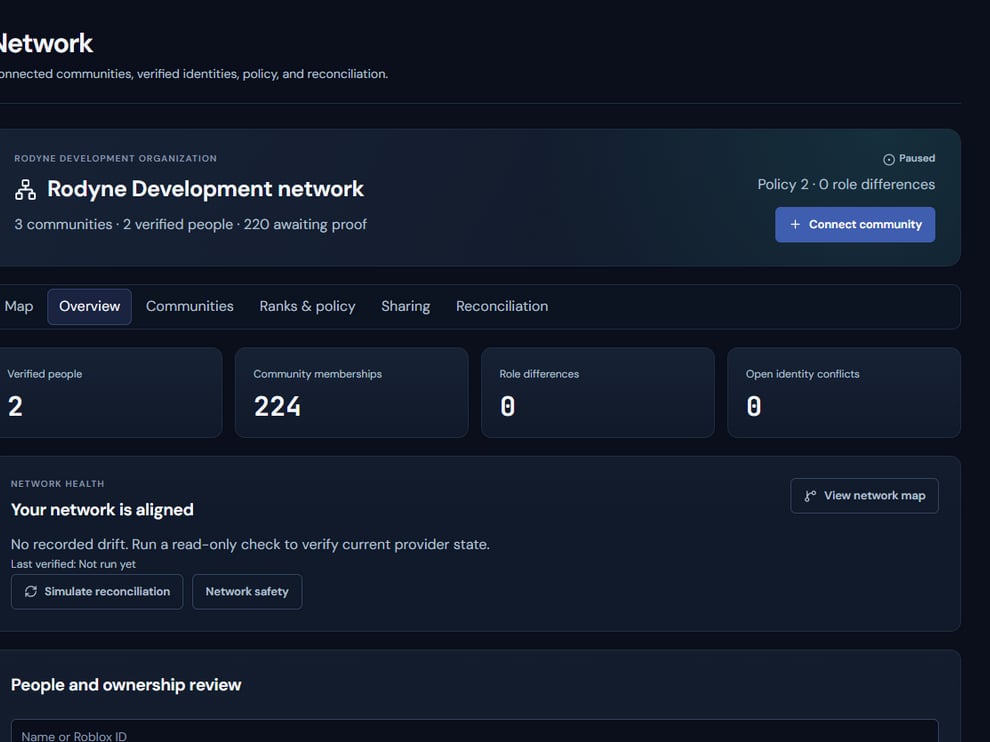 The screenshot above is from the live Rodyne product. Use it to orient yourself, but rely on the current record state and live provider checks when operating the workspace.
## Operating procedure
Add each community, group, and experience under exactly one controlling owner.
Relate local roles without erasing local provider identities.
Grant network authority independently from workspace management.
Review every current and desired target for a named canary.
Collect independent approval, enable writes, and verify revocations before grants.
## Acceptance checks
| Check | Ready when | If it is not ready |
| ---------- | ------------------------------------------- | -------------------------------------- |
| Ownership | Each resource has one controlling community | Resolve duplicate or ambiguous control |
| Revision | Simulation matches current policy | Run a new simulation |
| Completion | Every target is provider-confirmed | Keep the operation unresolved |
## Failure recovery
Use the kill switch to stop new claims when policy or provider behavior is unsafe. In-flight calls may still finish, so continue read-back and record the actual final state.
## Continue the workflow
The screenshot above is from the live Rodyne product. Use it to orient yourself, but rely on the current record state and live provider checks when operating the workspace.
## Operating procedure
Add each community, group, and experience under exactly one controlling owner.
Relate local roles without erasing local provider identities.
Grant network authority independently from workspace management.
Review every current and desired target for a named canary.
Collect independent approval, enable writes, and verify revocations before grants.
## Acceptance checks
| Check | Ready when | If it is not ready |
| ---------- | ------------------------------------------- | -------------------------------------- |
| Ownership | Each resource has one controlling community | Resolve duplicate or ambiguous control |
| Revision | Simulation matches current policy | Run a new simulation |
| Completion | Every target is provider-confirmed | Keep the operation unresolved |
## Failure recovery
Use the kill switch to stop new claims when policy or provider behavior is unsafe. In-flight calls may still finish, so continue read-back and record the actual final state.
## Continue the workflow