> ## Documentation Index
> Fetch the complete documentation index at: https://docs.rodyne.xyz/llms.txt
> Use this file to discover all available pages before exploring further.
# Studio connector reference
> Security, signing, events, retry identity, and in-game report contracts.
The connector is a server-only Roblox integration. It currently sends heartbeats, attendance intervals, and in-game report submissions.
## Files
| File | Purpose |
| ------------------- | ----------------------------------------------------------------------------- |
| `SHA256.luau` | SHA-256 and HMAC implementation with known-answer self-tests. |
| `Relay.server.luau` | Server heartbeat, attendance, report submission, signing, and retry behavior. |
## Credential scope
Credentials are scoped to a Roblox **universe ID**. Ingress rejects:
* A different universe ID.
* A revoked credential.
* An invalid HMAC signature.
* A timestamp more than 120 seconds from the server window.
* A malformed or replayed event outside the idempotent contract.
## Signature contract
HMAC covers the exact JSON request bytes. Do not parse and re-serialize the payload between signing and sending. Each event includes a unique event ID and timestamp.
Retries preserve the same event ID. This lets ingress acknowledge a repeat without creating duplicate attendance or reports.
## Attendance contract
* `EVENT_ID` is the Rodyne event UUID.
* The event's configured universe must match the credential.
* `Player.UserId` observed by the server is authoritative.
* Overlapping intervals are merged.
* Presence and duration do not encode a pass result.
## Report contract
```lua theme={null}
local accepted = game.ServerScriptService.Relay:WaitForChild("SubmitReport"):Invoke(
reporterPlayer,
reportedPlayer,
"Abusive behaviour",
"The submitted report description"
)
```
Requirements:
* Both arguments are current server `Player` objects.
* The reporter comes from Roblox's server-side event context, never a client-provided numeric ID.
* Title and description use the connector's bounded input contract.
* One submission per reporter is accepted every 30 seconds.
* `true` acknowledges ingestion, not completion of asynchronous record creation.
## Compatibility
Cmdr, Adonis, and HD Admin compatibility is not claimed until a version-specific installation has passed live verification. The connector does not execute those systems' commands.
## Rotation
Create a replacement credential, publish it, observe a recent heartbeat, then revoke the old one. Reversing that order can leave still-running servers unable to deliver.
## Guided walkthrough
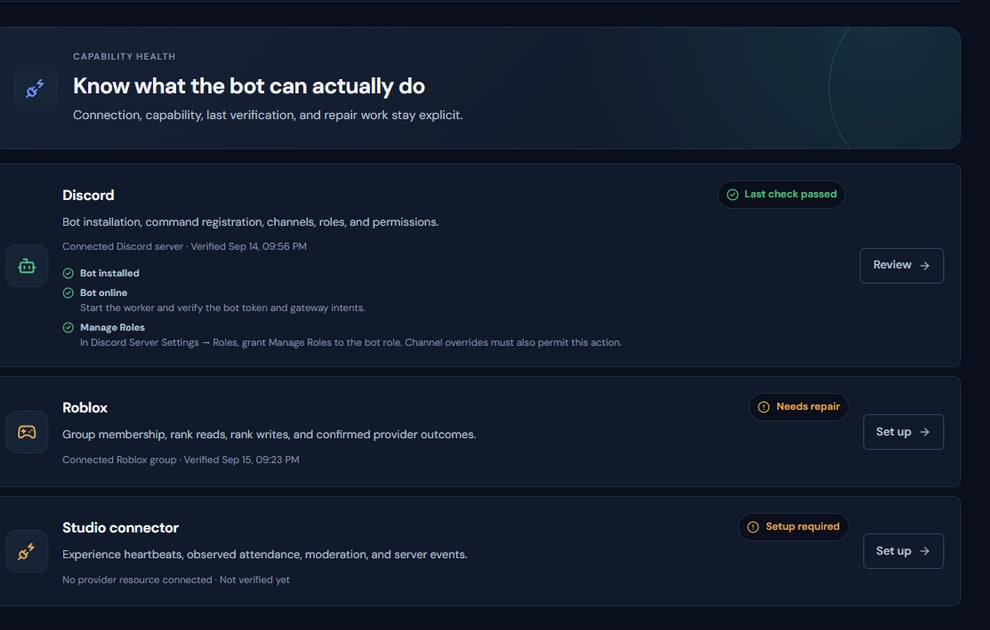 The screenshot above is from the live Rodyne product. Use it to orient yourself, but rely on the current record state and live provider checks when operating the workspace.
## Operating procedure
Bind it to the intended universe and capture the one-time secret securely.
Use the exact method, path, timestamp, event ID, and raw body required by the signature contract.
Calculate HMAC with the credential secret only in trusted server code.
Reuse the same event ID and payload for the same logical event.
Use Integrations and Activity to verify accepted, rejected, and replayed requests.
## Acceptance checks
| Check | Ready when | If it is not ready |
| ------ | -------------------------------------------- | ------------------------------------ |
| Clock | Timestamp is inside tolerance | Synchronize the server clock |
| Scope | Universe and credential agree | Use the correct credential |
| Replay | Duplicate event IDs do not duplicate records | Preserve the original retry identity |
## Failure recovery
A signature failure should be diagnosed from method, path, raw bytes, timestamp, and credential scope. Never log the secret or a reusable authorization header.
## Continue the workflow
The screenshot above is from the live Rodyne product. Use it to orient yourself, but rely on the current record state and live provider checks when operating the workspace.
## Operating procedure
Bind it to the intended universe and capture the one-time secret securely.
Use the exact method, path, timestamp, event ID, and raw body required by the signature contract.
Calculate HMAC with the credential secret only in trusted server code.
Reuse the same event ID and payload for the same logical event.
Use Integrations and Activity to verify accepted, rejected, and replayed requests.
## Acceptance checks
| Check | Ready when | If it is not ready |
| ------ | -------------------------------------------- | ------------------------------------ |
| Clock | Timestamp is inside tolerance | Synchronize the server clock |
| Scope | Universe and credential agree | Use the correct credential |
| Replay | Duplicate event IDs do not duplicate records | Preserve the original retry identity |
## Failure recovery
A signature failure should be diagnosed from method, path, raw bytes, timestamp, and credential scope. Never log the secret or a reusable authorization header.
## Continue the workflow