> ## Documentation Index
> Fetch the complete documentation index at: https://docs.rodyne.xyz/llms.txt
> Use this file to discover all available pages before exploring further.
# Launch checklist
> A practical production-readiness checklist for workspace owners.
Use this checklist before inviting the full staff team or advertising verification to members.
## Identity and access
* [ ] The workspace owner uses their own Discord account.
* [ ] At least one backup owner or manager can sign in.
* [ ] Staff presets and any custom capabilities match actual responsibilities.
* [ ] Discord role-based permissions are tested with a non-owner account before enforcement is enabled.
* [ ] Removed staff lose access immediately and old sessions appear in account management.
## Discord
* [ ] Rodyne is in the correct guild.
* [ ] Server Members intent is enabled.
* [ ] Message Content intent is enabled if ticket message capture and recovery are used.
* [ ] The bot role is above every managed support/member role.
* [ ] View Channels, Send Messages, Embed Links, Attach Files, Read Message History, Manage Channels, and Manage Roles are available where needed.
* [ ] Command registration has no unresolved errors.
## Roblox
* [ ] The group ID matches the intended community.
* [ ] The Open Cloud key belongs to an individual administrator account.
* [ ] `group:read` and `group:write` are present.
* [ ] Every managed mapping uses the real Rank ID, not a guessed label or position.
* [ ] Protected ranks are marked before staff begin requesting changes.
* [ ] One canary rank request completed with provider read-back.
## Verification and roles
* [ ] `/verify` or the verification message opens the expected Cnect host.
* [ ] A test member can confirm the correct Discord and Roblox accounts.
* [ ] Unmatched managed roles are removed while unrelated and protected roles remain.
* [ ] Bloxlink/RoWifi disagreement produces a safe stop rather than a guessed link.
* [ ] `/unlink` revokes the Roblox/Cnect link without deleting the Discord sign-in.
## Support and moderation
* [ ] Every ticket type has a private category, support roles, priority, and open-ticket limit.
* [ ] Panel preflight and test delivery pass.
* [ ] A separate requester confirms channel privacy and two-way replies.
* [ ] Closing blocks new replies; reopening restores access.
* [ ] Internal notes do not appear in requester-facing messages.
* [ ] Moderation confirmation, Discord hierarchy, DM status, and case audit are tested with a safe account.
## Events, Studio, and Dash
* [ ] Studio uses the universe ID and has a recent heartbeat.
* [ ] Attendance remains separate from pass/fail decisions.
* [ ] Member Dash is disabled until settings and reviewed releases are ready.
* [ ] An exact preview shows only approved member-safe fields and text.
* [ ] A withdrawal removes a release from the member view.
## Operations
* [ ] Owners know where to inspect failed and uncertain jobs.
* [ ] Backups and restore points match the selected plan.
* [ ] Billing management opens for the active subscription.
* [ ] Privacy and support contact routes are published to staff and members.
Do not broaden rollout after only a queued or HTTP-success result. Confirm the provider read-back, access effect, and audit record for each canary workflow.
## Guided walkthrough
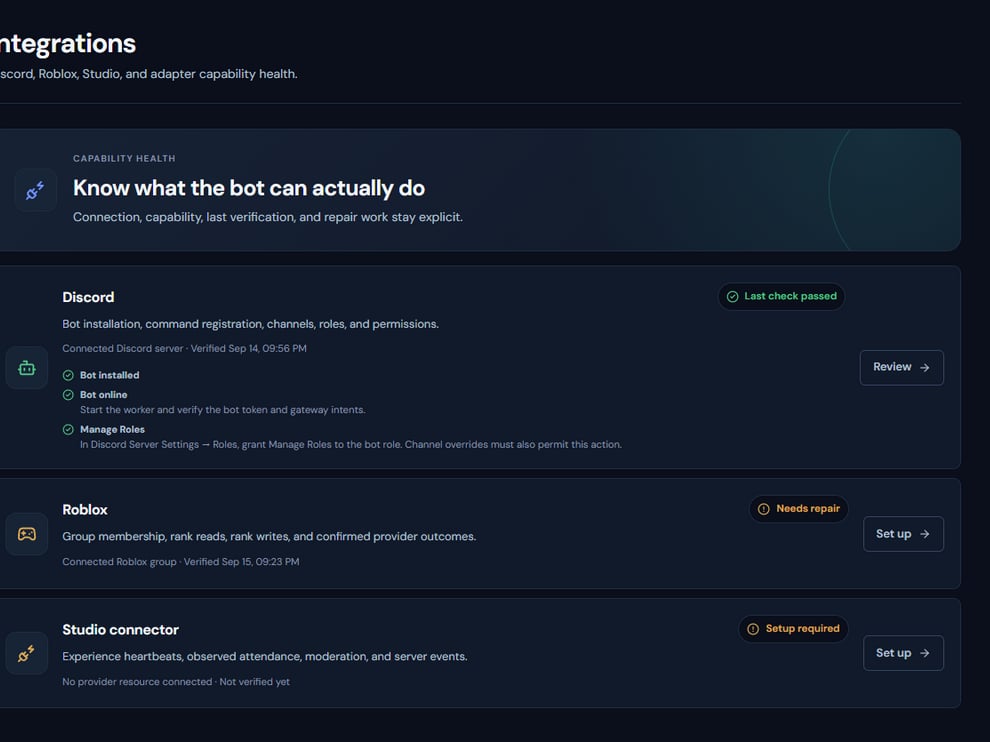 The screenshot above is from the live Rodyne product. Use it to orient yourself, but rely on the current record state and live provider checks when operating the workspace.
## Operating procedure
Confirm a primary and recovery operator before enforcing role-derived access.
Open each integration and resolve warnings rather than accepting a partially healthy state.
Use non-staff accounts for verification and ticket privacy checks.
Use low-risk rank and moderation canaries with the intended approval separation.
Record who tested each workflow, when it passed, and the final provider-confirmed result.
## Acceptance checks
| Check | Ready when | If it is not ready |
| ---------- | ------------------------------------------ | ------------------------------------------ |
| Access | Recovery owner can sign in | Restore access before enabling enforcement |
| Privacy | Unrelated members cannot see a test ticket | Fix categories, overwrites, and hierarchy |
| Operations | Staff know how to inspect uncertain work | Walk through Activity before launch |
## Failure recovery
A failed checklist item blocks only the dependent workflow, but security and identity failures should block the whole launch. Document the exception, disable the affected feature, and rerun the exact check after remediation.
## Continue the workflow
The screenshot above is from the live Rodyne product. Use it to orient yourself, but rely on the current record state and live provider checks when operating the workspace.
## Operating procedure
Confirm a primary and recovery operator before enforcing role-derived access.
Open each integration and resolve warnings rather than accepting a partially healthy state.
Use non-staff accounts for verification and ticket privacy checks.
Use low-risk rank and moderation canaries with the intended approval separation.
Record who tested each workflow, when it passed, and the final provider-confirmed result.
## Acceptance checks
| Check | Ready when | If it is not ready |
| ---------- | ------------------------------------------ | ------------------------------------------ |
| Access | Recovery owner can sign in | Restore access before enabling enforcement |
| Privacy | Unrelated members cannot see a test ticket | Fix categories, overwrites, and hierarchy |
| Operations | Staff know how to inspect uncertain work | Walk through Activity before launch |
## Failure recovery
A failed checklist item blocks only the dependent workflow, but security and identity failures should block the whole launch. Document the exception, disable the affected feature, and rerun the exact check after remediation.
## Continue the workflow