> ## Documentation Index
> Fetch the complete documentation index at: https://docs.rodyne.xyz/llms.txt
> Use this file to discover all available pages before exploring further.
# Configure commands
> Manage built-in Discord commands and create safe custom replies.
Open **Bot Management → Commands** to review built-in registration, enable or disable commands, preview behavior, and create custom replies.
## Built-in commands
Built-in commands cover verification, rank requests, cases, tickets, moderation, events, diagnostics, and Scout checks. Permissions are evaluated when the command runs; visibility in Discord does not guarantee that the actor is allowed to perform the action.
See the complete [Discord command reference](/reference/discord-commands).
## Custom commands
Each workspace can create up to 50 custom commands. A command supports:
* A lowercase name and Discord description.
* A plain message or embed response.
* Private or channel visibility.
* Everyone or staff-only access.
* A per-member cooldown.
* Up to five string options.
Safe placeholders are:
| Placeholder | Value |
| --------------- | ----------------------------------------------------------------- |
| `{user}` | Mentions the invoking member without allowing arbitrary mentions. |
| `{username}` | The invoking member's display name. |
| `{server}` | The connected server name. |
| `{channel}` | The channel where the command ran. |
| `{option:name}` | The value of the named string option. |
## Embed responses
The editor supports a title and link, color, author, thumbnail, image, footer, up to ten fields, and up to three URL buttons. HTTP(S) links are validated. Mentions do not notify users or roles.
Custom commands cannot execute arbitrary code or make arbitrary HTTP requests. Reserved built-in names cannot be overwritten.
## Registration lifecycle
The worker reconciles enabled commands to the connected guild. When definitions change, Discord registration updates automatically. Open **Bot Management → Activity** to inspect registration failures.
If a new built-in command conflicts with an older custom command, Rodyne preserves the custom command under a generated `-custom-` name instead of deleting it.
## Publishing checklist
1. Keep the name short and unambiguous.
2. Use a staff-only response if it reveals internal process.
3. Preview every placeholder and option.
4. Confirm URLs and image hosts are trusted.
5. Enable the command and wait for registration.
6. Test in the real guild with both an authorized and unauthorized account.
## Guided walkthrough
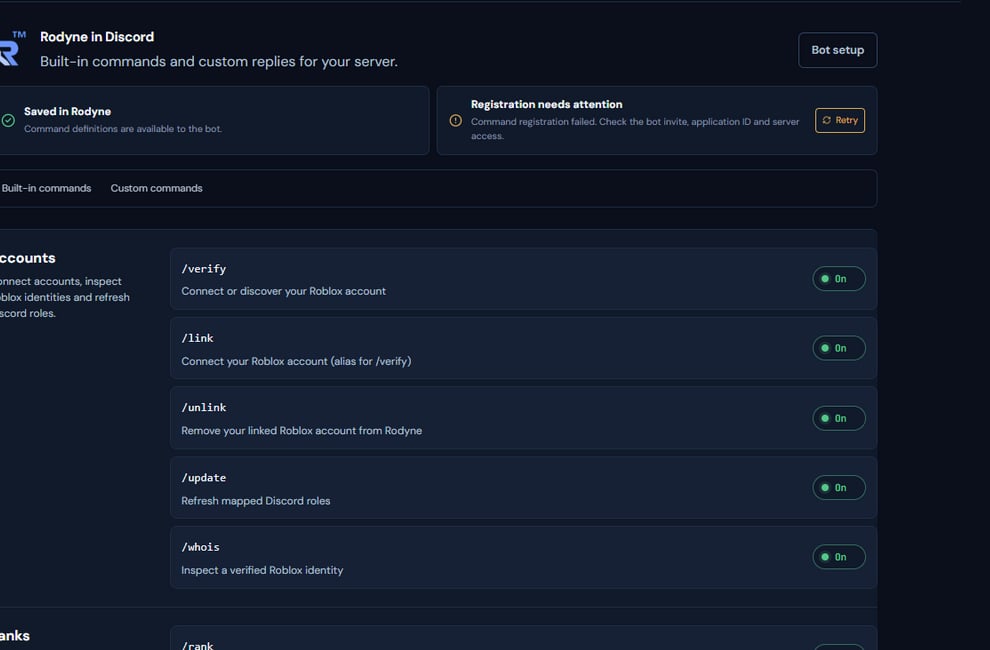 The screenshot above is from the live Rodyne product. Use it to orient yourself, but rely on the current record state and live provider checks when operating the workspace.
## Operating procedure
Disable commands the community will not use and note which require staff capabilities.
Choose visibility, audience, cooldown, placeholders, and any embed elements.
Exercise every option and placeholder, including missing optional values.
Enable the command and wait for Discord registration to complete.
Run it with authorized, unauthorized, and ordinary member accounts.
## Acceptance checks
| Check | Ready when | If it is not ready |
| ------------ | ---------------------------------------- | ------------------------------------------ |
| Name | Lowercase, unambiguous, and not reserved | Rename before publishing |
| Content | No internal detail is exposed publicly | Use staff-only or private response mode |
| Registration | Discord shows the current definition | Inspect command reconciliation in Activity |
## Failure recovery
If Discord still shows an old definition, do not repeatedly toggle the command. Check the latest registration job, correct the underlying permission or provider error, and let reconciliation apply the newest saved version.
## Continue the workflow
The screenshot above is from the live Rodyne product. Use it to orient yourself, but rely on the current record state and live provider checks when operating the workspace.
## Operating procedure
Disable commands the community will not use and note which require staff capabilities.
Choose visibility, audience, cooldown, placeholders, and any embed elements.
Exercise every option and placeholder, including missing optional values.
Enable the command and wait for Discord registration to complete.
Run it with authorized, unauthorized, and ordinary member accounts.
## Acceptance checks
| Check | Ready when | If it is not ready |
| ------------ | ---------------------------------------- | ------------------------------------------ |
| Name | Lowercase, unambiguous, and not reserved | Rename before publishing |
| Content | No internal detail is exposed publicly | Use staff-only or private response mode |
| Registration | Discord shows the current definition | Inspect command reconciliation in Activity |
## Failure recovery
If Discord still shows an old definition, do not repeatedly toggle the command. Check the latest registration job, correct the underlying permission or provider error, and let reconciliation apply the newest saved version.
## Continue the workflow