> ## Documentation Index
> Fetch the complete documentation index at: https://docs.rodyne.xyz/llms.txt
> Use this file to discover all available pages before exploring further.
# Build ticket panels
> Create typed Discord support panels with private routing and safe publication.
Ticket panels are configured in **Bot Management → Ticket panels**. One shared Discord embed can offer up to 25 ticket types, with up to five buttons per row.
## Start from a template
The **Support hub** template begins with User Support, User Report, Purchase Support, and Group Enquiries. Treat it as a starting structure: update the wording, category, roles, questions, limits, and priority for your server.
## Configure each ticket type
Each type can define:
* Name, description, and button label.
* Button style and optional Unicode or server emoji.
* Up to three additional intake questions.
* A private Discord category.
* Support roles.
* Per-requester open-ticket limit.
* Default priority.
The panel channel and embed appearance are shared across types.
Descriptions render as separate sections in the shared embed. Leave them blank when you write the same sections manually in the embed description.
## Server emojis
Choose **Server emoji** to use a static or animated emoji from the connected guild, or paste a Discord mention such as:
```text theme={null}
<:support:123456789012345678>
```
Refresh the server emoji catalog after changes. Emojis no longer available to the server are excluded from the picker.
## Test and publish
Rodyne checks the panel channel, every type's category and support roles, bot permissions, button limits, questions, and embed constraints.
Deliver the draft through the test workflow and inspect the result in Activity. A test does not replace a requester privacy test.
Publishing creates a confirmed version. Discord buttons continue using the last confirmed version if a later draft or replacement fails.
Open a ticket using a separate account. Confirm the channel is private, the correct support roles can see it, questions are preserved, and replies flow both ways.
## Version safety
Each opened ticket keeps the selected type's configuration. Later edits or removal do not silently change its category, support roles, questions, or reopening limit. A form opened before a new panel version asks the requester to reopen it instead of attaching answers to the wrong schema.
## When publication is uncertain
Open Activity and the panel's delivery detail. Verify the actual Discord message before retrying an ambiguous or expired write. Rodyne does not blindly repeat a possible Discord write because it could duplicate the panel.
## Guided walkthrough
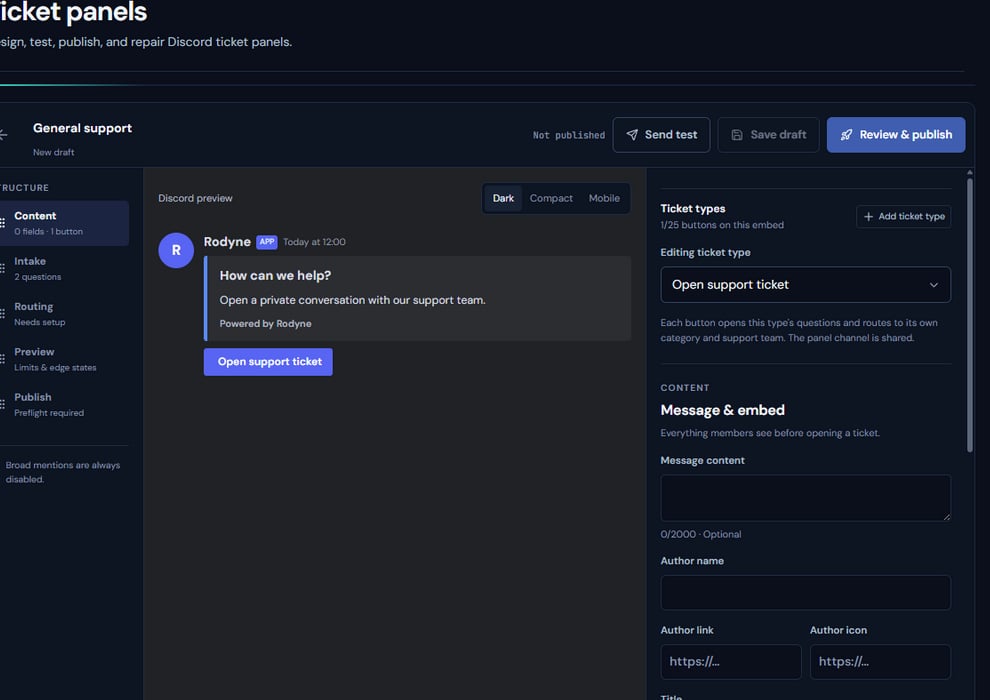 The screenshot above is from the live Rodyne product. Use it to orient yourself, but rely on the current record state and live provider checks when operating the workspace.
## Operating procedure
Use a staff test channel while the panel and bot permissions are still changing.
Set its category, support roles, priority, requester limit, and intake questions.
Check copy, buttons, layout, emojis, and embed limits across all types.
Resolve every type's errors and inspect the resulting Discord message.
Open a ticket as a separate requester and confirm all channel overwrites.
## Acceptance checks
| Check | Ready when | If it is not ready |
| ------- | ------------------------------------------------ | ----------------------------------------- |
| Routing | Each type opens in the intended private category | Correct the category and role assignments |
| Privacy | Only requester and support roles can view | Fix overwrites and bot hierarchy |
| Version | Discord uses the last confirmed panel version | Inspect delivery before republishing |
## Failure recovery
When publication is uncertain, check the target channel before retrying. If a message exists, repair or adopt that delivery instead of creating a second public panel.
## Continue the workflow
The screenshot above is from the live Rodyne product. Use it to orient yourself, but rely on the current record state and live provider checks when operating the workspace.
## Operating procedure
Use a staff test channel while the panel and bot permissions are still changing.
Set its category, support roles, priority, requester limit, and intake questions.
Check copy, buttons, layout, emojis, and embed limits across all types.
Resolve every type's errors and inspect the resulting Discord message.
Open a ticket as a separate requester and confirm all channel overwrites.
## Acceptance checks
| Check | Ready when | If it is not ready |
| ------- | ------------------------------------------------ | ----------------------------------------- |
| Routing | Each type opens in the intended private category | Correct the category and role assignments |
| Privacy | Only requester and support roles can view | Fix overwrites and bot hierarchy |
| Version | Discord uses the last confirmed panel version | Inspect delivery before republishing |
## Failure recovery
When publication is uncertain, check the target channel before retrying. If a message exists, repair or adopt that delivery instead of creating a second public panel.
## Continue the workflow