> ## Documentation Index
> Fetch the complete documentation index at: https://docs.rodyne.xyz/llms.txt
> Use this file to discover all available pages before exploring further.
# Rodyne documentation
> Set up your Roblox and Discord community, automate routine work, and keep every important action reviewable.
# Run your community with less guesswork
Rodyne brings Discord operations, Roblox group management, member records, approvals, support, events, and staff workflows into one audited workspace.
Rodyne never treats a queued task as a completed provider change. Rank, moderation, announcement, and ticket-panel work exposes its confirmed, partial, failed, or uncertain outcome.
Connect Discord, verify permissions, add Roblox access, and activate a plan.
Link Discord and Roblox identities and keep mapped roles current.
Publish private Discord support flows with typed intake and staff routing.
Request, approve, execute, and verify rank changes without losing the audit trail.
## Choose your path
Start with the [quickstart](/getting-started/quickstart), then configure [permissions](/administration/permissions), [role mappings](/guides/roles-and-ranks), and [ticket panels](/guides/ticket-panels).
Learn the [support queue](/guides/tickets), [reports and cases](/guides/reports-and-cases), and the meaning of [job outcomes](/reference/outcomes-and-jobs).
Use the [events guide](/guides/events) for scheduling, attendance, results, and rank follow-up.
Visit [identity linking](/cnect/identity-linking) for `/verify`, Cnect, unlinking, and privacy. The [Member Dash guide](/cnect/member-dash) explains personal record disclosure.
## Product areas
| Area | What it is for |
| ------------------------ | --------------------------------------------------------------------------------------------------------- |
| **Bot Management** | Commands, verification, role mappings, ticket panels, announcements, integrations, and delivery activity. |
| **Community Management** | Members, rank requests, support, reports, cases, events, duty, and analytics. |
| **Cnect** | First-party identity confirmation and controlled multi-community operations. |
| **Member Dash** | A separate, member-facing portal for reviewed personal record disclosures. |
Use the command palette in the dashboard to jump directly to a page or start a permitted action. Search understands terms such as “roles,” “tickets,” “promotion,” and “connector.”
## Safety model
Rodyne is designed around explicit identity, least privilege, separation of duties, and provider read-back:
* Discord membership alone does not grant staff dashboard access.
* A requester cannot approve their own protected rank change.
* Protected ranks and roles are not silently added or removed.
* Network writes remain separately controlled from local workspace actions.
* Member Dash releases require reviewed member-safe text; private notes and evidence are excluded.
* Provider failures do not turn into successful-looking records.
Take a new workspace from sign-in to a verified Discord and Roblox connection.
## Guided walkthrough
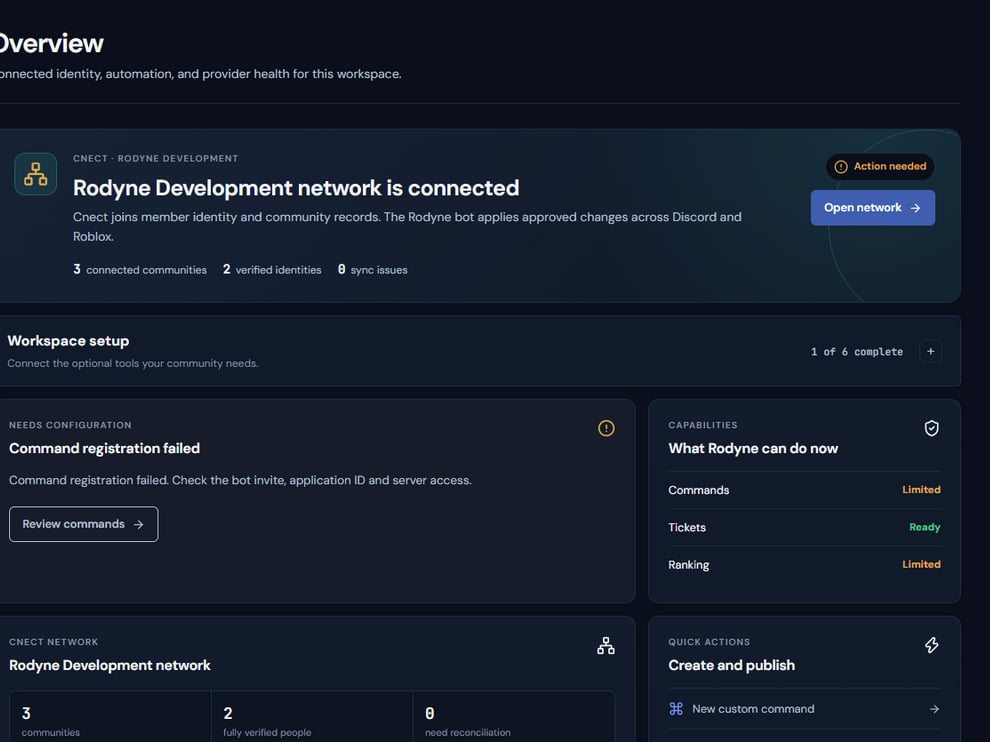 The screenshot above is from the live Rodyne product. Use it to orient yourself, but rely on the current record state and live provider checks when operating the workspace.
## Operating procedure
Confirm the Discord, Roblox, and worker indicators are healthy before changing policy.
Use the workspace switcher and verify the server name before viewing or changing records.
Open the member, ticket, case, event, or request that contains the full history and current state.
Keep the record open until Discord or Roblox read-back reaches a terminal outcome.
For high-impact work, confirm the actor, reason, target, and final provider state in Activity.
## Acceptance checks
| Check | Ready when | If it is not ready |
| ------------ | ------------------------------------------ | ---------------------------------------------------- |
| Workspace | The intended community name is visible | Switch workspaces before continuing |
| Integrations | Required providers show healthy capability | Open Integrations and resolve the failing check |
| Outcome | Every required target is confirmed | Use the job detail; do not infer success from Queued |
## Failure recovery
If an operation is partial or uncertain, stop at the affected record. Compare Rodyne's target result with the live Discord or Roblox object, then use only the narrow repair action offered for the unconfirmed target.
## Continue the workflow
The screenshot above is from the live Rodyne product. Use it to orient yourself, but rely on the current record state and live provider checks when operating the workspace.
## Operating procedure
Confirm the Discord, Roblox, and worker indicators are healthy before changing policy.
Use the workspace switcher and verify the server name before viewing or changing records.
Open the member, ticket, case, event, or request that contains the full history and current state.
Keep the record open until Discord or Roblox read-back reaches a terminal outcome.
For high-impact work, confirm the actor, reason, target, and final provider state in Activity.
## Acceptance checks
| Check | Ready when | If it is not ready |
| ------------ | ------------------------------------------ | ---------------------------------------------------- |
| Workspace | The intended community name is visible | Switch workspaces before continuing |
| Integrations | Required providers show healthy capability | Open Integrations and resolve the failing check |
| Outcome | Every required target is confirmed | Use the job detail; do not infer success from Queued |
## Failure recovery
If an operation is partial or uncertain, stop at the affected record. Compare Rodyne's target result with the live Discord or Roblox object, then use only the narrow repair action offered for the unconfirmed target.
## Continue the workflow