> ## Documentation Index
> Fetch the complete documentation index at: https://docs.rodyne.xyz/llms.txt
> Use this file to discover all available pages before exploring further.
# Discord command reference
> Built-in Rodyne commands and their safety behavior.
Command availability depends on workspace configuration, guild registration, and the invoking member's current access.
## Identity and verification
| Command | Behavior |
| -------------------------------- | ------------------------------------------------------------------------------------ |
| `/verify` | Starts or refreshes first-party Cnect verification and eligible role reconciliation. |
| `/link` | Alias for `/verify`. |
| `/unlink` | Removes the caller's Roblox OAuth/Cnect links while keeping their Discord sign-in. |
| `/update [user]` | Refreshes the caller, or another member when the actor is authorized. |
| `/whois [user]` | Resolves permitted identity and public Roblox profile context. |
| `/settings verification-embed …` | Publishes a configured verification message for the connected guild. |
## Ranking
| Command | Behavior |
| ---------------- | -------------------------------------------------------------------------------------- |
| `/rank set` | Creates a request for an eligible mapped target in the primary group. |
| `/promote` | Requests the immediately higher configured mapping. It does not skip a protected rank. |
| `/demote` | Requests the immediately lower configured mapping. |
| `/rank requests` | Lists waiting requests and exposes permitted approval actions. |
| `/rank status` | Shows the member's current recorded rank state. |
The requester cannot approve their own request. Target approval counts, protected ranks, stale expected roles, and current permissions are enforced.
## Moderation and cases
| Command | Behavior |
| ----------- | ------------------------------------------------------------------------------------- |
| `/ban` | Opens a private confirmation, then creates a case and durable Discord moderation job. |
| `/kick` | Opens a private confirmation, then creates a case and durable Discord moderation job. |
| `/newcase` | Creates or links a case from the current supported context. |
| `/cases` | Lists recent cases visible to the actor. |
| `/modlogs` | Reads permitted moderation history for a Discord user. |
| `/case` | Opens a case by number when access allows. |
| `/editcase` | Changes permitted case state or appends a note. |
Native Discord permission and hierarchy are rechecked when the job executes. Restricted-case capability remains separate.
## Tickets
`/ticket` subcommands can list, view, claim, privately note, close, or reopen supported tickets. Exact availability follows `tickets.read`, `tickets.write`, and `tickets.manage` plus the ticket's workspace scope.
## Events
| Command | Behavior |
| ------------------- | -------------------------------------------------------------- |
| `/event list` | Lists permitted scheduled events. |
| `/event create` | Creates an event using the same record model as the dashboard. |
| `/event view` | Opens event details. |
| `/event attendance` | Records or reviews attendance when permitted. |
## Information and diagnostics
| Command | Behavior |
| --------------------- | --------------------------------------------------------------------- |
| `/help` | Shows member or staff help appropriate to the actor. |
| `/server` | Shows configured server links and information. |
| `/debug` | Shows sanitized setup information; it never exposes provider secrets. |
| `/invite` | Returns the bot installation URL. |
| `/check user:@member` | Runs a configured Scout lookup after resolving an identity. |
| `/check roblox:123` | Runs a configured Scout lookup for a numeric Roblox ID. |
Scout results are third-party signals. Errors do not declare an account safe, erase prior history, or trigger automatic moderation.
## Guided walkthrough
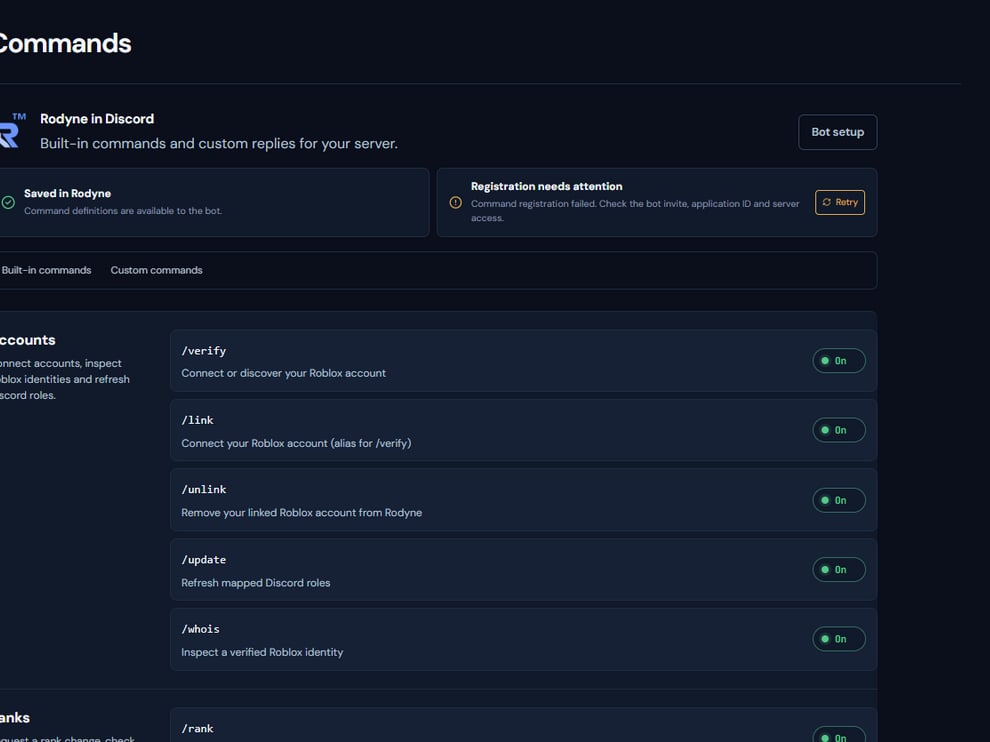 The screenshot above is from the live Rodyne product. Use it to orient yourself, but rely on the current record state and live provider checks when operating the workspace.
## Operating procedure
Use the catalog to confirm its exact name, module, and enabled state.
Determine whether it is member-safe, staff-only, or capability-gated.
Use exact members, records, rank mappings, and channels where required.
Submit the command and keep the returned record or reference.
Open Activity when the command creates provider-backed work.
## Acceptance checks
| Check | Ready when | If it is not ready |
| ------------- | --------------------------------------------------- | ----------------------------------------------- |
| Availability | Command is enabled and registered | Inspect registration jobs |
| Authorization | Actor has current Rodyne and Discord authority | Use the correct staff account or request access |
| Result | Returned record reaches its intended terminal state | Diagnose from the record |
## Failure recovery
A visible slash command can still be denied at execution because current membership, capability, native permission, or hierarchy changed. Treat the execution response as authoritative.
## Continue the workflow
The screenshot above is from the live Rodyne product. Use it to orient yourself, but rely on the current record state and live provider checks when operating the workspace.
## Operating procedure
Use the catalog to confirm its exact name, module, and enabled state.
Determine whether it is member-safe, staff-only, or capability-gated.
Use exact members, records, rank mappings, and channels where required.
Submit the command and keep the returned record or reference.
Open Activity when the command creates provider-backed work.
## Acceptance checks
| Check | Ready when | If it is not ready |
| ------------- | --------------------------------------------------- | ----------------------------------------------- |
| Availability | Command is enabled and registered | Inspect registration jobs |
| Authorization | Actor has current Rodyne and Discord authority | Use the correct staff account or request access |
| Result | Returned record reaches its intended terminal state | Diagnose from the record |
## Failure recovery
A visible slash command can still be denied at execution because current membership, capability, native permission, or hierarchy changed. Treat the execution response as authoritative.
## Continue the workflow