> ## Documentation Index
> Fetch the complete documentation index at: https://docs.rodyne.xyz/llms.txt
> Use this file to discover all available pages before exploring further.
# Outcomes and background jobs
> Interpret queued, running, partial, failed, expired, and uncertain provider work.
Rodyne stores provider work durably so a web request does not need to remain open while Discord or Roblox responds.
## Common states
| State | Meaning | What staff should do |
| ------------------------ | --------------------------------------------------------------------------- | ------------------------------------------------------------------------- |
| **Waiting for approval** | The request needs more distinct authorized approvers. | Review policy, expiry, and approver access. |
| **Queued** | The work is durable and waiting for a worker. | Wait; do not repeat the action. |
| **Running** | A worker owns the current lease and is evaluating or contacting a provider. | Monitor unless it exceeds normal operational time. |
| **Roblox updated** | Roblox read-back confirmed; later synchronization remains. | Do not repeat the Roblox change. |
| **Discord sync pending** | Roblox is confirmed and Discord reconciliation is still pending. | Follow the Discord target. |
| **Completed** | Every required target reached its confirmed terminal result. | Verify the intended access effect for high-risk work. |
| **Partially completed** | At least one target is confirmed and another failed or remains unresolved. | Repair only the unconfirmed target. |
| **Needs attention** | The job failed safely or requires operator review. | Read the failure code, current provider state, and offered repair action. |
| **Expired** | Approval, request, or execution window ended. | Re-evaluate current state and create fresh work if still needed. |
## Uncertain outcomes
An uncertain target means a provider request may have applied, but Rodyne could not safely prove the result. This can happen after a network timeout or expired worker lease.
Do not blindly retry an uncertain write. Check the actual Discord message/channel/role or Roblox rank first. A repeat can duplicate a message or apply the wrong follow-up.
## Idempotency
Rodyne gives mutations retry identities so re-submitting after a client disconnect does not create duplicate records. Use the page's built-in retry action instead of rebuilding the request in another tab.
Idempotency does not make every third-party provider write repeatable. Where a provider lacks its own idempotency key, Rodyne combines durable state, serialization, read-back, and operator review.
## Repair checklist
1. Confirm the exact workspace and record.
2. Read every target outcome.
3. Check live provider state.
4. Confirm current identity, permission, hierarchy, entitlement, and policy revision.
5. Use the narrowest available repair action.
6. Verify the new read-back and audit record.
## Guided walkthrough
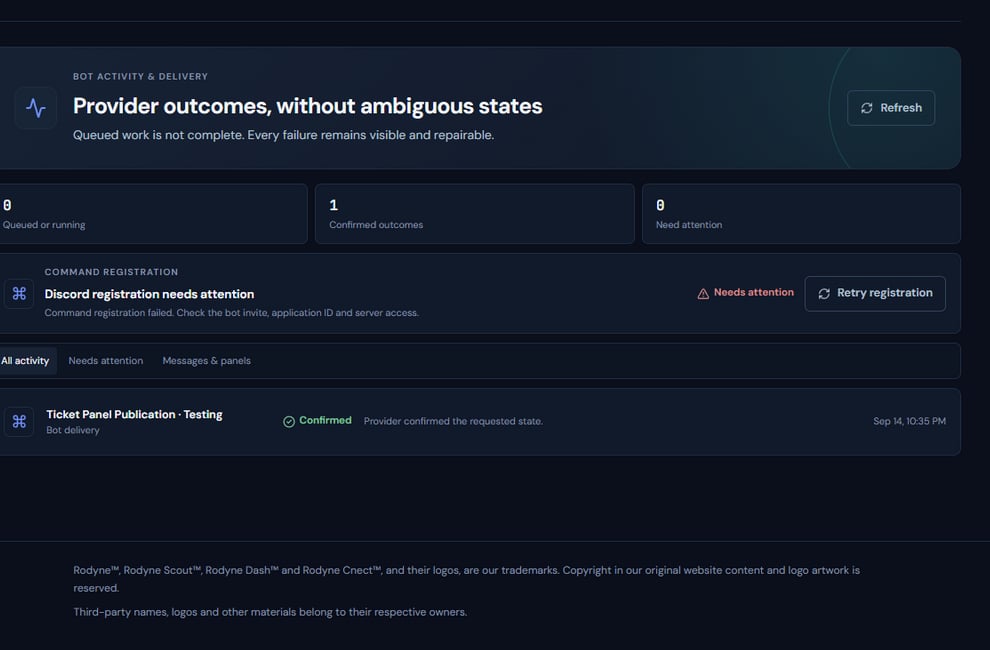 The screenshot above is from the live Rodyne product. Use it to orient yourself, but rely on the current record state and live provider checks when operating the workspace.
## Operating procedure
Start from the rank request, announcement, panel, ticket, case, or network operation.
A parent job can contain confirmed, failed, and unresolved targets at once.
Distinguish an active lease from a stale or expired operation.
Inspect the actual role, rank, message, channel, or heartbeat.
Wait, retry safely, repair one target, create fresh work, or escalate.
## Acceptance checks
| Check | Ready when | If it is not ready |
| ----------- | ------------------------------------------ | ---------------------------------- |
| Durability | Record exists even if the browser closed | Return to the originating workflow |
| Terminality | All required targets have terminal results | Continue monitoring |
| Safety | Uncertain writes were checked live | Do not retry |
## Failure recovery
If an operation is stuck beyond its expected window, do not manufacture completion by editing the surrounding record. Preserve the job, inspect lease and provider details, and use the supported repair path.
## Continue the workflow
The screenshot above is from the live Rodyne product. Use it to orient yourself, but rely on the current record state and live provider checks when operating the workspace.
## Operating procedure
Start from the rank request, announcement, panel, ticket, case, or network operation.
A parent job can contain confirmed, failed, and unresolved targets at once.
Distinguish an active lease from a stale or expired operation.
Inspect the actual role, rank, message, channel, or heartbeat.
Wait, retry safely, repair one target, create fresh work, or escalate.
## Acceptance checks
| Check | Ready when | If it is not ready |
| ----------- | ------------------------------------------ | ---------------------------------- |
| Durability | Record exists even if the browser closed | Return to the originating workflow |
| Terminality | All required targets have terminal results | Continue monitoring |
| Safety | Uncertain writes were checked live | Do not retry |
## Failure recovery
If an operation is stuck beyond its expected window, do not manufacture completion by editing the surrounding record. Preserve the job, inspect lease and provider details, and use the supported repair path.
## Continue the workflow