
Identity and access
- The workspace owner uses their own Discord account.
- At least one backup owner or manager can sign in.
- Staff presets and any custom capabilities match actual responsibilities.
- Discord role-based permissions are tested with a non-owner account before enforcement is enabled.
- Removed staff lose access immediately and old sessions appear in account management.
Discord
- Rodyne is in the correct guild.
- Server Members intent is enabled.
- Message Content intent is enabled if ticket message capture and recovery are used.
- The bot role is above every managed support/member role.
- View Channels, Send Messages, Embed Links, Attach Files, Read Message History, Manage Channels, and Manage Roles are available where needed.
- Command registration has no unresolved errors.
Roblox
- The group ID matches the intended community.
- The Open Cloud key belongs to an individual administrator account.
-
group:readandgroup:writeare present. - Every managed mapping uses the real Rank ID, not a guessed label or position.
- Protected ranks are marked before staff begin requesting changes.
- One canary rank request completed with provider read-back.
Verification and roles
-
/verifyor the verification message opens the expected Cnect host. - A test member can confirm the correct Discord and Roblox accounts.
- Unmatched managed roles are removed while unrelated and protected roles remain.
- Bloxlink/RoWifi disagreement produces a safe stop rather than a guessed link.
-
/unlinkrevokes the Roblox/Cnect link without deleting the Discord sign-in.
Support and moderation
- Every ticket type has a private category, support roles, priority, and open-ticket limit.
- Panel preflight and test delivery pass.
- A separate requester confirms channel privacy and two-way replies.
- Closing blocks new replies; reopening restores access.
- Internal notes do not appear in requester-facing messages.
- Moderation confirmation, Discord hierarchy, DM status, and case audit are tested with a safe account.
Events, Studio, and Dash
- Studio uses the universe ID and has a recent heartbeat.
- Attendance remains separate from pass/fail decisions.
- Member Dash is disabled until settings and reviewed releases are ready.
- An exact preview shows only approved member-safe fields and text.
- A withdrawal removes a release from the member view.
Operations
- Owners know where to inspect failed and uncertain jobs.
- Backups and restore points match the selected plan.
- Billing management opens for the active subscription.
- Privacy and support contact routes are published to staff and members.
Guided walkthrough
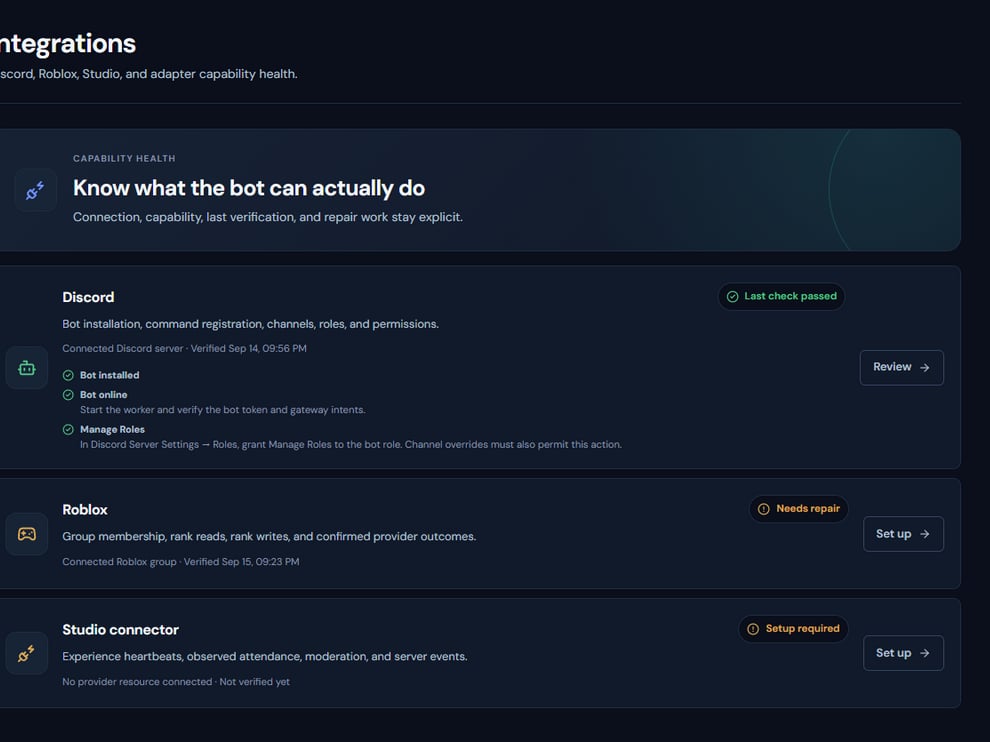
The Integrations page is the launch control point for Discord, Roblox, and Studio readiness.
Operating procedure
1
Assign an owner
Confirm a primary and recovery operator before enforcing role-derived access.
2
Validate providers
Open each integration and resolve warnings rather than accepting a partially healthy state.
3
Test member paths
Use non-staff accounts for verification and ticket privacy checks.
4
Test protected work
Use low-risk rank and moderation canaries with the intended approval separation.
5
Sign off
Record who tested each workflow, when it passed, and the final provider-confirmed result.