
Create the API key
1
Select an individual account
In Creator Hub, create the key under a user account that has the required permissions in the target group.
2
Choose the group resource
Scope the key to the exact Roblox group used by the workspace. Double-check the numeric group ID.
3
Add scopes
Add Group Read (
group:read) and Group Write (group:write). Read is needed for membership and verification; write is needed for rank execution.4
Store it in Rodyne
Open Bot Management → Integrations → Roblox, enter the key through the protected settings flow, and run the capability review.
Do not paste Roblox keys into Discord, screenshots, source control, support tickets, or client-side environment variables. Rotate a key immediately if it is exposed.
Why group-owned keys fail
Roblox group management endpoints require the key owner to be an individual account with community authority. A group-owned key can appear active and correctly scoped but still be rejected for group rank management.Build the rank ladder
After the connection passes:- Open Bot Management → Automations.
- Add the primary group.
- Select the real Roblox Rank ID for each managed rank.
- Map each rank to its Discord role.
- Set a unique numeric order from low to high.
- Mark protected ranks and configure the required approval count.
Safe verification
Run a canary request for a controlled member:- The expected current role must match.
- The target rank must be mapped and not protected.
- Required independent approvals must be collected.
- The job must confirm the Roblox read-back.
- Discord synchronization may follow as a separate outcome.
Guided walkthrough
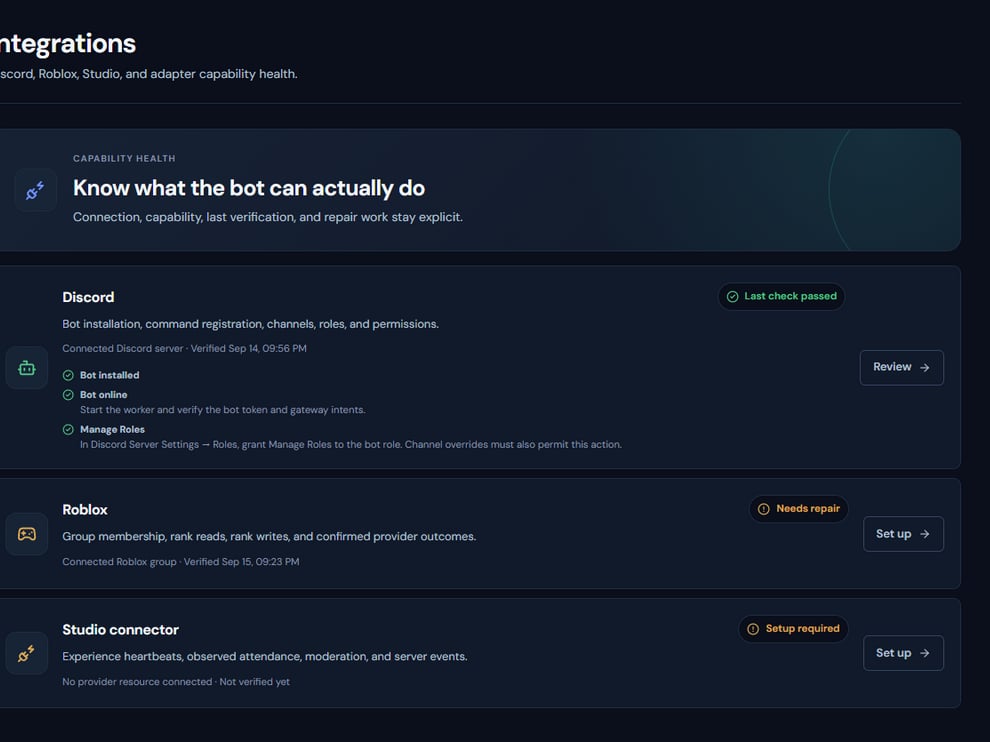
Roblox connection state and capability warnings remain visible beside the other providers.
Operating procedure
1
Identify the group
Copy the numeric group ID from the actual group, not a search result or experience URL.
2
Create a user-owned key
Use an individual administrator account and scope the key only to the required group.
3
Grant read and write
Include group read for verification and group write for approved rank changes.
4
Run capability review
Let Rodyne confirm the group, key owner authority, and supported operations.
5
Complete a read-back canary
Change one controlled member and verify the resulting Roblox rank before broad rollout.