
Identity and verification
Ranking
The requester cannot approve their own request. Target approval counts, protected ranks, stale expected roles, and current permissions are enforced.
Moderation and cases
Native Discord permission and hierarchy are rechecked when the job executes. Restricted-case capability remains separate.
Tickets
/ticket subcommands can list, view, claim, privately note, close, or reopen supported tickets. Exact availability follows tickets.read, tickets.write, and tickets.manage plus the ticket’s workspace scope.
Events
Information and diagnostics
Scout results are third-party signals. Errors do not declare an account safe, erase prior history, or trigger automatic moderation.
Guided walkthrough
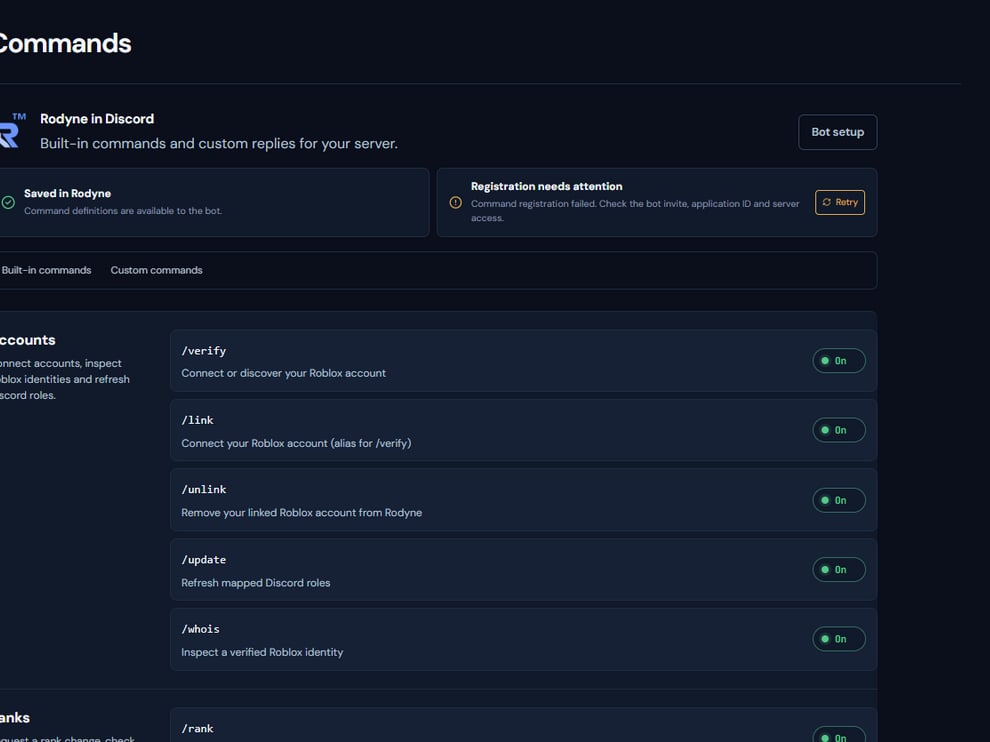
The command catalog shows what is enabled and what Discord should register.
Operating procedure
1
Find the command
Use the catalog to confirm its exact name, module, and enabled state.
2
Check the audience
Determine whether it is member-safe, staff-only, or capability-gated.
3
Prepare identifiers
Use exact members, records, rank mappings, and channels where required.
4
Run once
Submit the command and keep the returned record or reference.
5
Follow asynchronous work
Open Activity when the command creates provider-backed work.