
Common states
Uncertain outcomes
An uncertain target means a provider request may have applied, but Rodyne could not safely prove the result. This can happen after a network timeout or expired worker lease.Idempotency
Rodyne gives mutations retry identities so re-submitting after a client disconnect does not create duplicate records. Use the page’s built-in retry action instead of rebuilding the request in another tab. Idempotency does not make every third-party provider write repeatable. Where a provider lacks its own idempotency key, Rodyne combines durable state, serialization, read-back, and operator review.Repair checklist
- Confirm the exact workspace and record.
- Read every target outcome.
- Check live provider state.
- Confirm current identity, permission, hierarchy, entitlement, and policy revision.
- Use the narrowest available repair action.
- Verify the new read-back and audit record.
Guided walkthrough
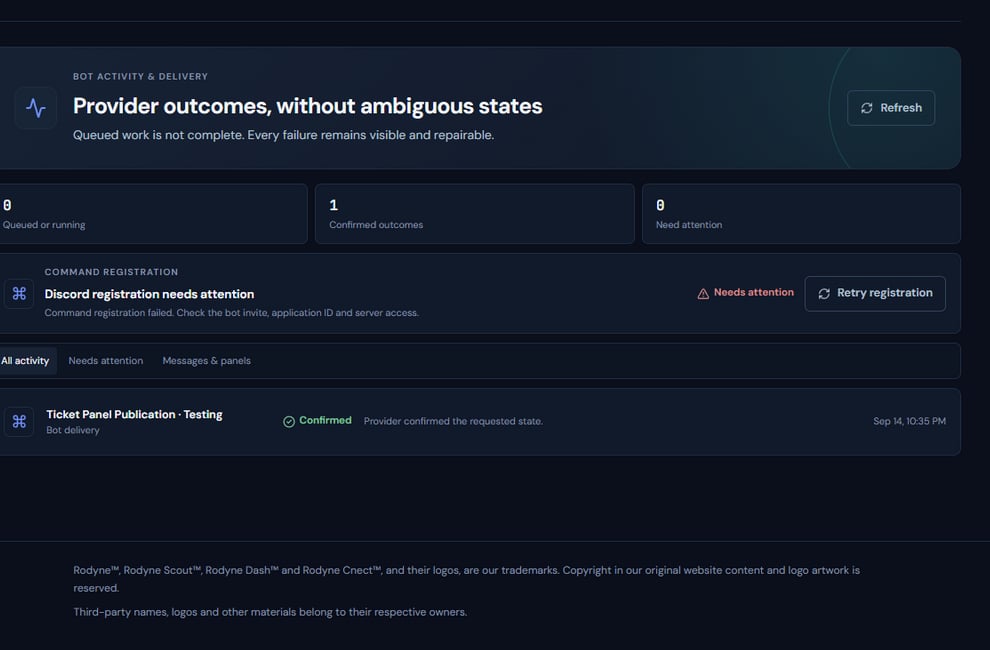
The Activity surface shows durable jobs separately from the provider targets they operate on.
Operating procedure
1
Open the source record
Start from the rank request, announcement, panel, ticket, case, or network operation.
2
Read every target
A parent job can contain confirmed, failed, and unresolved targets at once.
3
Check attempts and timestamps
Distinguish an active lease from a stale or expired operation.
4
Verify live provider state
Inspect the actual role, rank, message, channel, or heartbeat.
5
Choose the narrow response
Wait, retry safely, repair one target, create fresh work, or escalate.