
Install
1
Allow HTTP requests
In Roblox Studio, open Game Settings → Security and enable Allow HTTP Requests.
2
Create the connector container
In
ServerScriptService, create a folder named Relay.3
Add SHA256
Create a ModuleScript named
SHA256 and paste the official SHA256.luau release supplied by Rodyne.4
Add the server script
Create a server Script named
Relay and paste Relay.server.luau.5
Create an experience credential
In Bot Management → Integrations → Studio, create a credential scoped to the experience’s universe ID, not its place ID.
6
Configure and publish
Copy the credential ID and one-time secret into the server script. Set
INGRESS_URL to the HTTPS hooks origin without a trailing slash, publish, and start a server.7
Verify the heartbeat
Return to Studio integration settings and wait for a recent heartbeat. Creating a credential by itself does not prove the connector is installed.
Attendance
SetEVENT_ID to the scheduled Rodyne event UUID and ensure the event uses the same universe ID. Server-observed Player.UserId is the identity source.
Attendance records presence only:
- Overlapping intervals are merged when calculating duration.
- A duration does not imply pass or completion.
- Staff confirm event results separately.
In-game reports
Call the server-onlySubmitReport BindableFunction from your existing validated server handler:
Player instances currently in the server. Never accept a client-supplied reporter ID. A true result means ingress accepted the signed event; record creation continues asynchronously. Show a failure to the member when it returns false.
Rotate a credential
- Create a replacement credential.
- Publish the replacement ID and secret to the experience.
- Wait for a heartbeat from the new credential.
- Revoke the old credential.
Guided walkthrough
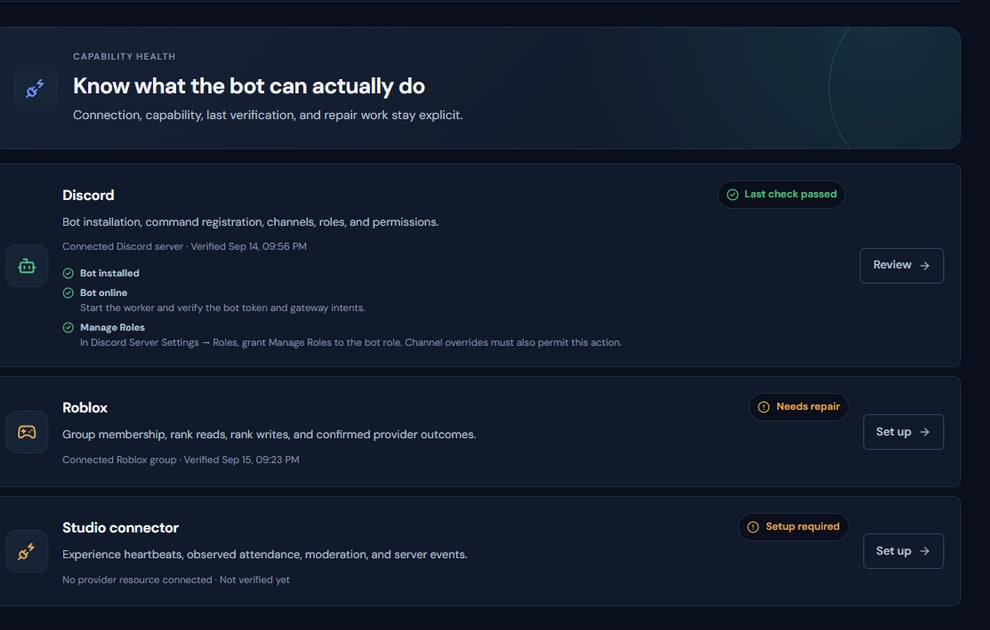
Studio credentials and heartbeat health are reviewed from the same integration surface.
Operating procedure
1
Confirm the universe
Resolve the experience’s universe ID and keep it separate from place IDs.
2
Create a scoped credential
Generate one credential for the intended experience and copy its secret once.
3
Install server-side
Place the connector in ServerScriptService and keep secrets away from client containers.
4
Publish and start a server
A Studio edit alone does not produce a live heartbeat.
5
Verify ingestion
Confirm a recent heartbeat, then test one attendance interval or controlled report.