
What a member record contains
Depending on your permissions and available data, a member view can include:- Discord and Roblox identities and verification state.
- Current recorded roles and mapped rank context.
- Restrictions and moderation history.
- Support tickets and related reports/cases.
- Event attendance and confirmed results.
- Rank requests and provider outcomes.
- An audited activity timeline.
Search and pagination
Search by the visible identity fields supported by the workspace. The directory uses cursor pagination so it remains stable as records change. Clear filters before assuming a member is absent.Start work from a member
Authorized staff can use the member context to:- Start a rank request.
- Add a member to a report or case.
- Review ticket context.
- Record an event result.
- Inspect identity conflicts before a provider action.
Batch rank preparation
Each eligible member row can hold a target rank selection. Draft selections persist for the current staff member across filtering, pagination, and reloads. One shared reason submits up to 100 rows; each row still retains its own approval policy and stale-state checks.Guided walkthrough
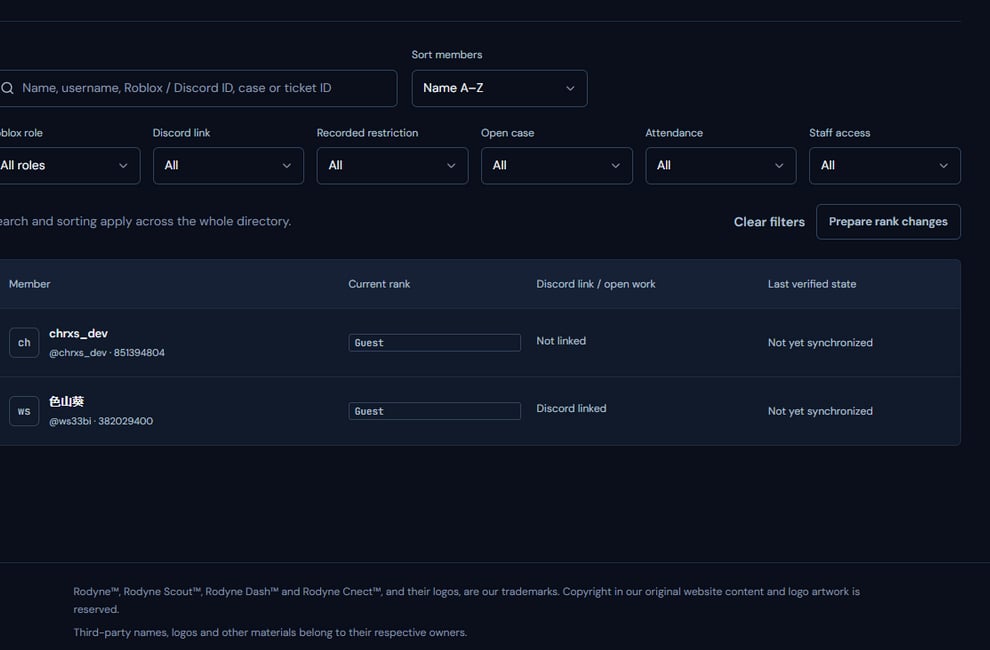
The member directory is the starting point for identity-aware community work.
Operating procedure
1
Search exact identifiers
Prefer Discord and Roblox IDs over display names when consequences matter.
2
Confirm link state
Review first-party verification and any identity conflict before action.
3
Read relevant history
Inspect rank, ticket, case, event, and restriction context allowed by your role.
4
Start scoped work
Create the request or record from the verified member context.
5
Return to the timeline
Confirm the new record and its final outcome appear on the same member.