
Member entry points
/verifystarts or refreshes first-party Cnect verification./linkis an alias for/verify./updaterefreshes the caller; authorized staff can update another member.- A published verification message opens the guild-specific Cnect flow.
- The Cnect home page lets a signed-in member review their own active links.
Publish a verification message
Staff with Manage integrations can use:image and thumbnail values must be HTTPS URLs. Omitted fields reuse the saved design, or the default design on first publication. The selected channel must be a text or announcement channel in the connected server, and the bot needs Send Messages and Embed Links.
Every verification message includes the fixed footer Never Share your passwords with anyone.
What happens during verification
1
Bind the request to Discord
The member signs into Cnect with Discord. The short-lived request is tied to that Discord member and guild.
2
Confirm Roblox ownership
The member signs into the configured Roblox flow and reviews the exact accounts before confirmation.
3
Resolve group membership
Rodyne reads every bound Roblox group and finds matching rank mappings.
4
Reconcile Discord roles
Matching unprotected roles are added. Unmatched unprotected managed roles are removed. Unrelated, still-shared, and protected roles are preserved.
Third-party discovery
Cnect is the authoritative first-party link. If no Cnect record exists, Rodyne can query configured Bloxlink and RoWifi integrations for the exact guild and Discord member.- Results are validated as numeric Roblox IDs and cached briefly.
- Provider disagreement stops role changes.
- A discovery that conflicts with another member’s Cnect link stops role changes.
- Third-party results are not silently converted into permanent Cnect ownership.
After
/unlink, automatic discovery stays disabled until the member explicitly runs /link or /verify, or confirms a fresh Cnect request. Old requests cannot restore the unlinked account.Unlinking
/unlink removes the caller’s Roblox OAuth connection and Cnect links across Rodyne communities. Their Discord account and sign-in remain connected. Community records are not automatically deleted; members should follow the workspace’s privacy process for record requests.
Verification fails safely
No managed roles change when:- Group membership lookup fails.
- Identity providers disagree.
- The Roblox identity conflicts with an existing first-party link.
- The mapped Discord role is protected or above the bot.
- The member is no longer in the bound Discord guild.
Guided walkthrough
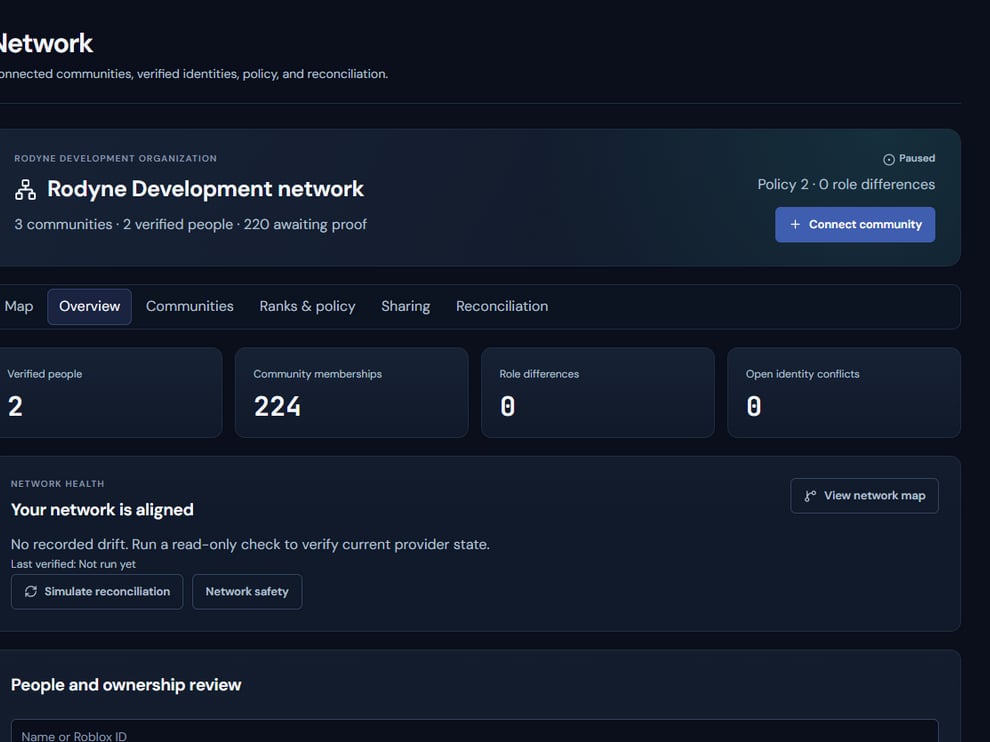
Cnect keeps identity ownership and connected-community policy explicit.
Operating procedure
1
Publish one entry point
Place the verification message in a channel visible to the intended members.
2
Complete first-party proof
Use a controlled Discord and Roblox account to finish the complete Cnect flow.
3
Review mapped roles
Confirm that eligible unprotected roles are added and stale managed roles are removed.
4
Test conflict handling
Verify that provider disagreement or duplicate ownership stops reconciliation.
5
Test unlinking
Confirm that unlinking prevents silent third-party relinking until a new explicit request.